On this page
- Part 1 · Plain React
- 1. Scaffold the Project
- 2. Static JSX First
- 3. From Hardcoded Rows to .map()
- 4. useState for Search
- 5. Fetch From the API
- 6. Server Search and Debounce
- 7. Sorting and Pagination
- Part 2 · Ant Design
- 8. Swap in Ant Design
- Part 3 · Redux Toolkit
- 9. Why Redux Now
- 10. The Slice
- 11. The Store
- 12. Connect React to Redux
- Part 4 · RTK Query
- 13. Why RTK Query
- 14. The API Service
- 15. Wire RTK Query Into the Store
- 16. Delete the Manual Fetch
- 17. The Bug I Hit
- Wrap-up
- Final Project Structure
- What Lives Where
- The Architecture Has a Name
- Resources
I built this while practicing for live-coding interviews. My first attempt started with the full stack at once — TypeScript, a Redux store, an API layer, a folder structure — and it was overwhelming. Redux, RTK Query, and Ant Design were all new to me, and when everything appears on screen at the same time, you can't tell which piece is solving which problem.
So I started over in plain JavaScript with one rule: build only what you need, when you need it — and introduce a library only after writing the plain React code it replaces. Static JSX first. Then state. Then the API. Then Ant Design, Redux Toolkit, and RTK Query, each arriving at the moment the code starts to hurt without it. That's also how I'd want to build in an interview: get something on screen, then make it dynamic.
This is the progression the tutorial follows:
Static JSX
  → .map()
    → useState
      → useEffect + fetch
        → loading / error
          → debounce
            → sorting / pagination
              → Ant Design
                → Redux Toolkit
                  → RTK Query
The finished app is a product browser over the public DummyJSON API: debounced search, sorting, and server-side pagination. The code is on GitHub at lpdecastro/redux-demo.liandrejohn.com, and you can try the live product browser demo. The repo is the source of truth — every final-state file in this post matches it exactly. Seventeen steps, four parts.
1. Scaffold the Project
Create a Vite + React project and add Bootstrap — the one library I already knew, used here purely for layout and spacing:
npm create vite@latest product-browser -- --template react
cd product-browser
npm install
npm install bootstrap
npm run dev
Then trim src/main.jsx down to the essentials and import Bootstrap's CSS. Delete the index.css import Vite generated:
import { StrictMode } from 'react';
import { createRoot } from 'react-dom/client';

import 'bootstrap/dist/css/bootstrap.min.css';

import App from './App.jsx';

createRoot(document.getElementById('root')).render(
  <StrictMode>
    <App />
  </StrictMode>
);
Notice what's not installed: no Redux, no Ant Design, no RTK Query. Nothing needs them yet. The shipped repo ended up on React 19.2, Vite 8, Redux Toolkit 2, React Redux 9, Ant Design 6, and Bootstrap 5.3 — but each one gets installed in the step that first needs it. The whole project is two files right now:
src/
├── App.jsx
└── main.jsx
2. Static JSX First
Before state, before APIs, build the screen. A heading, a search box, a sort dropdown, and a table with two hardcoded rows:
const App = () => {
  return (
    <div className='container py-4'>
      <h1 className='mb-4'>Products</h1>

      <div className='row g-3 mb-4'>
        <div className='col-md-8'>
          <input type='text' className='form-control' placeholder='Search products...' />
        </div>

        <div className='col-md-4'>
          <select className='form-select'>
            <option>Name A-Z</option>
            <option>Name Z-A</option>
            <option>Price: Low to High</option>
            <option>Price: High to Low</option>
          </select>
        </div>
      </div>

      <table className='table table-striped'>
        <thead>
          <tr>
            <th>Product</th>
            <th>Category</th>
            <th>Price</th>
            <th>Rating</th>
            <th>Stock</th>
          </tr>
        </thead>

        <tbody>
          <tr>
            <td>iPhone 15</td>
            <td>Smartphones</td>
            <td>$999</td>
            <td>4.5</td>
            <td>20</td>
          </tr>

          <tr>
            <td>MacBook Pro</td>
            <td>Laptops</td>
            <td>$1999</td>
            <td>4.8</td>
            <td>10</td>
          </tr>
        </tbody>
      </table>
    </div>
  );
};

export default App;
Roughly what you should see:
Products

[ Search products................ ] [ Name A-Z ▼ ]

-------------------------------------------------
Product       Category       Price   Rating Stock
-------------------------------------------------
iPhone 15     Smartphones    $999    4.5    20
MacBook Pro   Laptops        $1999   4.8    10
-------------------------------------------------
This is the interview reasoning: "First, I'll build the UI and confirm the structure works. Then I'll make it dynamic." No state, no API, no architecture. If the layout is wrong, you find out now, while it costs nothing to fix — not after you've wired a store to it.
3. From Hardcoded Rows to .map()
Move the rows into an array above the component:
const products = [
  {
    id: 1,
    title: 'iPhone 15',
    category: 'smartphones',
    price: 999,
    rating: 4.5,
    stock: 20,
  },
  {
    id: 2,
    title: 'MacBook Pro',
    category: 'laptops',
    price: 1999,
    rating: 4.8,
    stock: 10,
  },
];
Then replace the two hardcoded <tr>s with one .map():
<tbody>
  {products.map((product) => (
    <tr key={product.id}>
      <td>{product.title}</td>
      <td>{product.category}</td>
      <td>${product.price}</td>
      <td>{product.rating}</td>
      <td>{product.stock}</td>
    </tr>
  ))}
</tbody>
The mental model: for every product, create one table row. The key tells React which row is which, so it can update the right one when the list changes. The data is still fake, but the table is now driven by data — which is the only thing the API step will need to swap.
4. useState for Search
Make search work with plain React state. Import useState, store the search text, and make the input controlled — its value comes from state, and typing updates state:
import { useState } from 'react';

// inside App:
const [search, setSearch] = useState('');

const filteredProducts = products.filter((product) =>
  product.title.toLowerCase().includes(search.toLowerCase())
);<input
type='text'
className='form-control'
placeholder='Search products...'
value={search}
onChange={(e) => setSearch(e.target.value)}
/>
{filteredProducts.map((product) => (
// ...same <tr> as before
))}
What useState gives you is a pair:
const [search, setSearch] = useState('');

search          → the current value
setSearch(...)  → change the value, and React re-renders
Every keystroke calls setSearch, React re-renders App, filteredProducts is recalculated, and the table shows fewer rows. Keep this pair in mind, because it's the anchor for everything that follows: Redux is basically another place to store state. When it shows up in Part 3, setSearch will still exist — it will just live somewhere else.
5. Fetch From the API
Time for real data. Delete the hardcoded products array, add useEffect, and keep three pieces of state for the request:
import { useEffect, useState } from 'react';

// inside App:
const [products, setProducts] = useState([]);
const [loading, setLoading] = useState(true);
const [error, setError] = useState(null);

useEffect(() => {
  const fetchProducts = async () => {
    try {
      setLoading(true);
      setError(null);

      const response = await fetch('https://dummyjson.com/products?limit=10');

      if (!response.ok) {
        throw new Error('Failed to fetch products');
      }

      const data = await response.json();

      setProducts(data.products);
    } catch (error) {
      setError(error.message);
    } finally {
      setLoading(false);
    }
  };

  fetchProducts();
}, []);
And show the two non-happy states above the table:
{loading && <p>Loading...</p>}

{error && <div className='alert alert-danger'>{error}</div>}
Two details matter here. The empty dependency array [] means "run once, after the first render." And the response.ok check is easy to forget: fetch only rejects on network failure, so a 404 or 500 sails straight into response.json() unless you throw yourself. DummyJSON responds with products, total, skip, and limit — we'll use total soon.
This is the traditional API pattern, and it's worth naming each piece, because Part 4 replaces almost all of it:
products  → the API data
loading   → the request is still running
error     → the request failed
useEffect → when to run the request
try/catch → turning failures into state
6. Server Search and Debounce
Filtering locally only searches the 10 products we downloaded. DummyJSON has a real search endpoint, /products/search?q=phone, so search should go to the server. But we don't want a request per keystroke, which means two states instead of one:
const [searchInput, setSearchInput] = useState(''); // what I'm typing right now
const [search, setSearch] = useState(''); // what we actually send to the API

useEffect(() => {
  const timeout = setTimeout(() => {
    setSearch(searchInput);
  }, 300);

  return () => clearTimeout(timeout);
}, [searchInput]);
That's a debounce. Every keystroke changes searchInput, which re-runs the effect. The cleanup function cancels the previous timer before the new one starts, so setSearch only fires once you stop typing for 300ms. The input now binds to searchInput:
<input
  type='text'
  className='form-control'
  placeholder='Search products...'
  value={searchInput}
  onChange={(e) => setSearchInput(e.target.value)}
/>
Then the fetch picks its URL from search and re-runs whenever search changes:
const url = search
  ? `https://dummyjson.com/products/search?q=${encodeURIComponent(search)}&limit=10`
  : 'https://dummyjson.com/products?limit=10';

const response = await fetch(url);

// ...and the effect's dependency array becomes:
}, [search]);
Why bother:
Without debounce:            With a 300ms debounce:

i       → API request        iphone
ip      → API request          ↓
iph     → API request        wait 300ms
ipho    → API request          ↓
iphon   → API request        one API request
iphone  → API request
Hold on to the setTimeout detail. In Step 17 I wrote this same effect with the wrong timer function, and it broke pagination in a way that took a minute to trace.
7. Sorting and Pagination
DummyJSON supports sortBy, order, limit, and skip. That means more state:
const [sortBy, setSortBy] = useState('title');
const [order, setOrder] = useState('asc');
const [page, setPage] = useState(1);
const [total, setTotal] = useState(0);

const limit = 10;
The fetch now builds its query string with URLSearchParams and depends on every filter:
useEffect(() => {
  const fetchProducts = async () => {
    try {
      setLoading(true);
      setError(null);

      const skip = (page - 1) * limit;

      const endpoint = search
        ? 'https://dummyjson.com/products/search'
        : 'https://dummyjson.com/products';

      const params = new URLSearchParams({ limit, skip, sortBy, order });

      if (search) {
        params.set('q', search);
      }

      const response = await fetch(`${endpoint}?${params.toString()}`);

      if (!response.ok) {
        throw new Error('Failed to fetch products');
      }

      const data = await response.json();

      setProducts(data.products);
      setTotal(data.total);
    } catch (error) {
      setError(error.message);
    } finally {
      setLoading(false);
    }
  };

  fetchProducts();
}, [search, sortBy, order, page]);
A new search should start from page 1 — page 4 of "iphone" results probably doesn't exist. So the debounce resets the page too:
const timeout = setTimeout(() => {
  setSearch(searchInput);
  setPage(1);
}, 300);
The sort dropdown encodes both values in one string, like price-desc, and splits it on change:
<select
  className='form-select'
  value={`${sortBy}-${order}`}
  onChange={(e) => {
    const [newSortBy, newOrder] = e.target.value.split('-');

    setSortBy(newSortBy);
    setOrder(newOrder);
    setPage(1);
  }}
>
  <option value='title-asc'>Name A-Z</option>
  <option value='title-desc'>Name Z-A</option>
  <option value='price-asc'>Price: Low to High</option>
  <option value='price-desc'>Price: High to Low</option>
</select>
And Previous/Next buttons go below the table:
<div className='d-flex gap-2 align-items-center'>
  <button
    className='btn btn-outline-primary'
    disabled={page === 1}
    onClick={() => setPage(page - 1)}
  >
    Previous
  </button>

  <span>Page {page}</span>

  <button
    className='btn btn-outline-primary'
    disabled={page * limit >= total}
    onClick={() => setPage(page + 1)}
  >
    Next
  </button>
</div>
The plain React version works. Now look at what one component is holding:
searchInput
search
sortBy
order
page
total
products
loading
error
Nine pieces of state, a hand-written fetch, a debounce, and three places that remember to reset the page. This should start feeling slightly annoying. That's intentional. Every remaining step removes some of this by handing it to a tool built for exactly that job.
8. Swap in Ant Design
npm install antd
Bootstrap gives you CSS classes. Ant Design gives you React components. With Bootstrap, you write <input className='form-control' /> and the class styles a normal HTML element. With Ant Design, you write <Input /> — a component that brings its own markup, styling, and behavior. Same for <select> → <Select />, the alert div → <Alert />, and the whole <table> + buttons → <Table />.
Import the four components and describe the table's columns as data. dataIndex names the product field each column reads; render customizes how it's shown:
import { Alert, Input, Select, Table } from 'antd';

// inside App:
const columns = [
  {
    title: 'Product',
    dataIndex: 'title',
  },
  {
    title: 'Category',
    dataIndex: 'category',
  },
  {
    title: 'Price',
    dataIndex: 'price',
    render: (price) => `$${price.toFixed(2)}`,
  },
  {
    title: 'Rating',
    dataIndex: 'rating',
  },
  {
    title: 'Stock',
    dataIndex: 'stock',
  },
];
Swap the input and the dropdown. AntD's Select takes options as an array and calls onChange with the value itself, not an event. I also added a fifth sort, "Highest Rated", since DummyJSON can sort on any field:
<Input
  placeholder='Search products...'
  value={searchInput}
  onChange={(e) => setSearchInput(e.target.value)}
/>

<Select
  className='w-100'
  value={`${sortBy}-${order}`}
  onChange={(value) => {
    const [newSortBy, newOrder] = value.split('-');

    setSortBy(newSortBy);
    setOrder(newOrder);
    setPage(1);
  }}
  options={[
    { value: 'title-asc', label: 'Name A-Z' },
    { value: 'title-desc', label: 'Name Z-A' },
    { value: 'price-asc', label: 'Price: Low to High' },
    { value: 'price-desc', label: 'Price: High to Low' },
    { value: 'rating-desc', label: 'Highest Rated' },
  ]}
/>
Then replace the error div, the loading paragraph, the whole <table>, and the Previous/Next buttons with two components:
{error && <Alert type='error' message={error} className='mb-3' />}

<Table
  rowKey='id'
  columns={columns}
  dataSource={products}
  loading={loading}
  pagination={{
    current: page,
    pageSize: limit,
    total,
    showSizeChanger: false,
    onChange: (newPage) => setPage(newPage),
  }}
/>
That one Table replaces the table markup, the loading indicator, and the pagination buttons — and the pagination is better than mine: numbered pages, not just Previous/Next. Bootstrap stays for page layout (container, row, col-md-*, spacing).
What Ant Design does not do is just as important: it doesn't replace React state, Redux, or the API call. All nine pieces of state from Step 7 are still sitting in App. AntD changed how the app looks, not how its data moves.
9. Why Redux Now
Look at four of those states together:
const [search, setSearch] = useState('');
const [sortBy, setSortBy] = useState('title');
const [order, setOrder] = useState('asc');
const [page, setPage] = useState(1);
These aren't random. Together they describe the current product filters — app-level state, not one widget's private detail. And the moment you split App into components the way a real app would be split, they have to travel:
App                ← owns search, sortBy, order, page
├── SearchBar      ← needs search + a setter
├── SortControls   ← needs sortBy, order + setters
├── ProductTable   ← needs all four to fetch
└── Pagination     ← needs page + a setter
That's a lot of props passed down for the sake of passing them down. Redux gives that state one shared home outside the component tree:
Redux store
└── filters
    ├── search
    ├── sortBy
    ├── order
    └── page
If you remember one sentence from Part 3, make it this: Redux is useState, but stored outside the component. Any component can read it, and any component can ask to change it, without props in between.
npm install @reduxjs/toolkit react-redux
@reduxjs/toolkit is the official, batteries-included way to write Redux, and it already includes RTK Query — you don't install that separately. react-redux is the bridge that lets React components talk to the store.
10. The Slice
Now a folder becomes necessary — the first one beyond src/:
src/
├── features/
│   └── filters/
│       └── filterSlice.js   # new
├── App.jsx
└── main.jsx
Start with just the state. These are the same four starting values from the four useState calls, grouped into one object:
import { createSlice } from '@reduxjs/toolkit';

const initialState = {
  search: '',
  sortBy: 'title',
  order: 'asc',
  page: 1,
};

const filterSlice = createSlice({
  name: 'filters',

  initialState,

  reducers: {},
});
Next, describe how the state is allowed to change. One function per change — notice that setSearch and setSort also reset page, exactly like the plain React version did:
reducers: {
  setSearch: (state, action) => {
    state.search = action.payload;
    state.page = 1;
  },

  setSort: (state, action) => {
    state.sortBy = action.payload.sortBy;
    state.order = action.payload.order;
    state.page = 1;
  },

  setPage: (state, action) => {
    state.page = action.payload;
  },
},
Finally, export what the rest of the app needs. Here's the complete file, as it is in the repo:
import { createSlice } from '@reduxjs/toolkit';

const initialState = {
  search: '',
  sortBy: 'title',
  order: 'asc',
  page: 1,
};

const filterSlice = createSlice({
  name: 'filters',

  initialState,

  reducers: {
    setSearch: (state, action) => {
      state.search = action.payload;
      state.page = 1;
    },

    setSort: (state, action) => {
      state.sortBy = action.payload.sortBy;
      state.order = action.payload.order;
      state.page = 1;
    },

    setPage: (state, action) => {
      state.page = action.payload;
    },
  },
});

export const { setSearch, setSort, setPage } = filterSlice.actions;

export default filterSlice.reducer;
Four words carry the whole idea, and they map neatly onto useState:
- Action — a plain object describing what happened:
{ type: 'filters/setPage', payload: 2 }. - Action creator — a function that builds that object for you.
setPage(2)returns the action above; it doesn't change anything by itself. - Reducer — the function that decides how state changes for a given action.
setPage: (state, action) => { state.page = action.payload; }. - Slice — one section of the store: its initial state plus its reducers, with action creators generated from them.
So setPage(2) from useState becomes dispatch(setPage(2)) with Redux — almost the same line, but routed through the store:
Component
  ↓
dispatch(setPage(2))
  ↓
Redux store
  ↓
setPage reducer
  ↓
state.page = 2
  ↓
React sees the updated state and re-renders
This is the step where I had the most questions. These are the ones that unlocked it.
Here's what createSlice saves you from writing. This is a hand-written equivalent, adapted from the learning notes I left at the bottom of the repo's filterSlice.js:
// What createSlice generates, written by hand (conceptually)
const filterSlice = {
  name: 'filters',

  actions: {
    setSearch: (value) => ({
      type: 'filters/setSearch',
      payload: value,
    }),

    setSort: (value) => ({
      type: 'filters/setSort',
      payload: value,
    }),

    setPage: (value) => ({
      type: 'filters/setPage',
      payload: value,
    }),
  },

  reducer: (state = initialState, action) => {
    switch (action.type) {
      case 'filters/setSearch':
        return {
          ...state,
          search: action.payload,
          page: 1,
        };

      case 'filters/setSort':
        return {
          ...state,
          sortBy: action.payload.sortBy,
          order: action.payload.order,
          page: 1,
        };

      case 'filters/setPage':
        return {
          ...state,
          page: action.payload,
        };

      default:
        return state;
    }
  },
};
So filterSlice.reducer is one big reducer function that handles all three action types, and filterSlice.actions holds the three action creators. The slice file is the definition; next, we plug it into a store.
11. The Store
Another folder, because now there's something to put in it:
src/
├── app/
│   └── store.js   # new
├── features/
│   └── filters/
│       └── filterSlice.js
├── App.jsx
└── main.jsximport { configureStore } from '@reduxjs/toolkit';
import filtersReducer from '../features/filters/filterSlice';
export const store = configureStore({
reducer: {
filters: filtersReducer,
},
});
configureStore creates the store — the one container for all Redux state. The reducer object says: "make a section called filters, and let filtersReducer manage it." That filters key is what creates state.filters; it's separate from name: 'filters' inside the slice, which only prefixes action types. They often match, but they do different jobs.
The resulting state:
{
  filters: {
    search: '',
    sortBy: 'title',
    order: 'asc',
    page: 1
  }
}12. Connect React to Redux
Wrap the app in Provider, which makes the store available to every component inside it. This is the final main.jsx, as it is in the repo:
import { StrictMode } from 'react';
import { createRoot } from 'react-dom/client';

import 'bootstrap/dist/css/bootstrap.min.css';

import App from './App.jsx';
import { Provider } from 'react-redux';
import { store } from './app/store.js';

createRoot(document.getElementById('root')).render(
  <StrictMode>
    <Provider store={store}>
      <App />
    </Provider>
  </StrictMode>
);
In App.jsx, two hooks connect the component to the store:
import { useDispatch, useSelector } from 'react-redux';
import { setPage, setSearch, setSort } from './features/filters/filterSlice';

// inside App:
const dispatch = useDispatch();
const { search, sortBy, order, page } = useSelector((state) => state.filters);useSelectorreads state. Redux passes the entire store state into your callback;(state) => state.filterspicks the filters section, and the destructuring is plain JavaScript. When that section changes, the component re-renders.useDispatchgives you the store'sdispatchfunction, which sends action objects to the store.
Now delete the four filter useStates:
const [search, setSearch] = useState('');
const [sortBy, setSortBy] = useState('title');
const [order, setOrder] = useState('asc');
const [page, setPage] = useState(1);
But keep const [searchInput, setSearchInput] = useState('');. That's deliberate: not every piece of state belongs in Redux. searchInput is the half-typed text that changes on every keystroke and that nothing else in the app cares about. It stays local; only the debounced result goes to the store.
Then every setter call becomes a dispatch. The debounce no longer resets the page itself — the setSearch reducer already does:
useEffect(() => {
  const timeout = setTimeout(() => {
    dispatch(setSearch(searchInput));
  }, 300);

  return () => clearTimeout(timeout);
}, [searchInput, dispatch]);

// <Select onChange>:
onChange={(value) => {
  const [sortBy, order] = value.split('-');

  dispatch(
    setSort({
      sortBy,
      order,
    })
  );
}}

// <Table pagination>:
onChange: (newPage) => dispatch(setPage(newPage)),
The fetch effect doesn't change at all: it still reads search, sortBy, order, and page — they just come from useSelector now instead of useState. Here's everything that happens behind one dispatch:
dispatch(setSearch('iphone'))
  ↓
setSearch('iphone') builds { type: 'filters/setSearch', payload: 'iphone' }
  ↓
dispatch sends it to the store
  ↓
the store runs the filters reducer
  ↓
state.filters.search = 'iphone', state.filters.page = 1
  ↓
useSelector notices state.filters changed
  ↓
App re-renders with the new values
  ↓
the fetch effect sees a new search and runs again
State is now split by who needs it:
useState
└── searchInput                       # temporary, this component only

Redux Toolkit
├── search, sortBy, order, page       # the app's filters

still in useState (for now)
└── products, loading, error, total # server data — that's Part 413. Why RTK Query
Redux now owns the filters, but App still hand-manages the API request:
const [products, setProducts] = useState([]);
const [loading, setLoading] = useState(true);
const [error, setError] = useState(null);
const [total, setTotal] = useState(0);

useEffect(() => {
  // fetch, response.ok, try/catch/finally...
}, [search, sortBy, order, page]);
This is a different kind of state. The filters are client state — the app decides what they are. Products, loading, and errors are server state — a copy of data that lives on someone else's server, which you have to request, wait for, handle failures for, and ideally cache. RTK Query is the part of Redux Toolkit built specifically for server state:
Redux Toolkit (createSlice)     RTK Query (createApi)

search                          products from the API
sortBy                          total
order                           loading / fetching
page                            error
                                cached responses
                                the requests themselves
Before RTK Query, you write all of this:
products / setProducts
loading  / setLoading
error    / setError
total    / setTotal
useEffect
fetch + response.ok
try / catch / finally
With RTK Query, one generated hook returns it:
const { data, isLoading, isFetching, isError } = useGetProductsQuery({
  search,
  sortBy,
  order,
  page,
  limit,
});
14. The API Service
The last new folder:
src/
├── app/
│   └── store.js
├── features/
│   └── filters/
│       └── filterSlice.js
├── services/
│   └── productsApi.js   # new
├── App.jsx
└── main.jsx
Start with where requests go. reducerPath names this API's section of the store; fetchBaseQuery is a small wrapper around fetch that already handles the base URL, JSON parsing, and treating non-2xx responses as errors — the response.ok check from Step 5, built in:
import { createApi, fetchBaseQuery } from '@reduxjs/toolkit/query/react';

export const productsApi = createApi({
  reducerPath: 'productsApi',

  baseQuery: fetchBaseQuery({
    baseUrl: 'https://dummyjson.com/',
  }),

  endpoints: (builder) => ({}),
});
Then define the one operation the app needs. builder.query is for reading data. Its query function receives the arguments the component passes in and returns the request to make — the same endpoint switch and skip math as Step 7:
endpoints: (builder) => ({
  getProducts: builder.query({
    query: ({ search, sortBy, order, page, limit }) => ({
      url: search ? 'products/search' : 'products',

      params: {
        ...(search && { q: search }),
        sortBy,
        order,
        limit,
        skip: (page - 1) * limit,
      },
    }),
  }),
}),
Finally, export the hook. You never write useGetProductsQuery — createApi generates it from the endpoint name: use + GetProducts + Query. The complete file, as it is in the repo:
import { createApi, fetchBaseQuery } from '@reduxjs/toolkit/query/react';

export const productsApi = createApi({
  reducerPath: 'productsApi',

  baseQuery: fetchBaseQuery({
    baseUrl: 'https://dummyjson.com/',
  }),

  endpoints: (builder) => ({
    getProducts: builder.query({
      query: ({ search, sortBy, order, page, limit }) => ({
        url: search ? 'products/search' : 'products',

        params: {
          ...(search && { q: search }),
          sortBy,
          order,
          limit,
          skip: (page - 1) * limit,
        },
      }),
    }),
  }),
});

export const { useGetProductsQuery } = productsApi;
This file is dense with JavaScript syntax that has nothing to do with Redux. These were my questions:
And here's what createApi hands back, conceptually — again adapted from the notes at the bottom of the repo file. Compare it with createSlice, which only gave us a reducer and action creators:
// Conceptually, createApi() gives you an object roughly like this
const productsApi = {
  reducerPath: 'productsApi',

  reducer: function apiReducer(state, action) {
    // manages RTK Query cache/loading/error state
  },

  middleware: function apiMiddleware(store) {
    // handles fetching, caching, refetching, etc.
  },

  endpoints: {
    getProducts: {
      // your query definition, plus generated helpers:
      initiate: function (args) {
        // starts the request
      },

      select: function (args) {
        // reads the cached result from Redux state
      },
    },
  },

  // generated React hook
  useGetProductsQuery: function (args) {
    // 1. subscribes to Redux state
    // 2. dispatches the request if needed
    // 3. returns data/loading/error
  },

  util: {
    // cache utilities, resetApiState, etc.
  },
};

// createSlice() → reducer + action creators
// createApi()   → reducer + middleware + endpoints + hooks + caching logic
15. Wire RTK Query Into the Store
createApi returned a reducer and a middleware. Both go into the store. This is the final store.js, as it is in the repo:
import { configureStore } from '@reduxjs/toolkit';
import filtersReducer from '../features/filters/filterSlice';
import { productsApi } from '../services/productsApi';

export const store = configureStore({
  reducer: {
    filters: filtersReducer,

    [productsApi.reducerPath]: productsApi.reducer,
  },

  middleware: (getDefaultMiddleware) => getDefaultMiddleware().concat(productsApi.middleware),
});
Two new lines, two new pieces of syntax.
The store now has two sections: filters, which you wrote, and productsApi, which RTK Query manages for you.
16. Delete the Manual Fetch
The payoff step. In App.jsx, delete:
- the
products,loading,error, andtotalstates; - the entire fetch
useEffect—URLSearchParams,response.ok,try/catch/finally, all of it.
And replace them with one hook call:
import { useGetProductsQuery } from './services/productsApi';

// inside App:
const limit = 10;

const { data, isLoading, isFetching, isError } = useGetProductsQuery({
  search,
  sortBy,
  order,
  page,
  limit,
});datais DummyJSON's response —data.productsanddata.total. It'sundefineduntil the first response arrives, hence thedata?.in the JSX.isLoadingis true only for the first load, when there's no data yet.isFetchingis true for any request in flight, including page changes — so the table can keep showing old rows under a spinner instead of blanking out.isErrorreplaces the hand-written error state.
RTK Query also caches results per unique set of arguments. Go to page 2, then back to page 1, and page 1 comes from the cache instantly. The manual fetch version re-requested it every time. You didn't write any caching code; it came with the hook.
The finished app also replaces the table with explicit states: a Loading... message for the first load, a No products found. message when a search matches nothing, and the table only when there's something to show. Here's the complete final App.jsx, verbatim from the repo:
import { Alert, Input, Select, Table } from 'antd';
import { useEffect, useState } from 'react';
import { useDispatch, useSelector } from 'react-redux';
import { setPage, setSearch, setSort } from './features/filters/filterSlice';
import { useGetProductsQuery } from './services/productsApi';

const App = () => {
  const dispatch = useDispatch();
  const { search, sortBy, order, page } = useSelector((state) => state.filters);

  const [searchInput, setSearchInput] = useState('');

  const limit = 10;

  const { data, isLoading, isFetching, isError } = useGetProductsQuery({
    search,
    sortBy,
    order,
    page,
    limit,
  });

  const columns = [
    {
      title: 'Product',
      dataIndex: 'title',
    },
    {
      title: 'Category',
      dataIndex: 'category',
    },
    {
      title: 'Price',
      dataIndex: 'price',
      render: (price) => `$${price.toFixed(2)}`,
    },
    {
      title: 'Rating',
      dataIndex: 'rating',
    },
    {
      title: 'Stock',
      dataIndex: 'stock',
    },
  ];

  useEffect(() => {
    const timeout = setTimeout(() => {
      dispatch(setSearch(searchInput));
    }, 300);

    return () => clearTimeout(timeout);
  }, [searchInput, dispatch]);

  return (
    <div className='container py-4'>
      <h1 className='mb-4'>Products</h1>

      <div className='row g-3 mb-4'>
        <div className='col-md-8'>
          <Input
            placeholder='Search products...'
            value={searchInput}
            onChange={(e) => {
              setSearchInput(e.target.value);
              dispatch(setPage(1));
            }}
          />
        </div>

        <div className='col-md-4'>
          <Select
            className='w-100'
            value={`${sortBy}-${order}`}
            onChange={(value) => {
              const [sortBy, order] = value.split('-');

              dispatch(
                setSort({
                  sortBy,
                  order,
                })
              );
            }}
            options={[
              {
                value: 'title-asc',
                label: 'Name A-Z',
              },
              {
                value: 'title-desc',
                label: 'Name Z-A',
              },
              {
                value: 'price-asc',
                label: 'Price: Low to High',
              },
              {
                value: 'price-desc',
                label: 'Price: High to Low',
              },
              {
                value: 'rating-desc',
                label: 'Highest Rated',
              },
            ]}
          />
        </div>
      </div>

      {isLoading && <p className='text-center py-5 text-muted'>Loading...</p>}

      {isError && <Alert type='error' message='Failed to load products.' className='mb-3' />}

      {!isLoading && !isError && data?.products.length === 0 && (
        <p className='text-center py-5 text-muted'>No products found.</p>
      )}

      {!isLoading && !isError && data?.products.length > 0 && (
        <>
          <Table
            rowKey='id'
            columns={columns}
            dataSource={data?.products ?? []}
            loading={isLoading || isFetching}
            pagination={{
              current: page,
              pageSize: limit,
              total: data?.total ?? 0,
              showSizeChanger: false,
              onChange: (newPage) => dispatch(setPage(newPage)),
            }}
          />
        </>
      )}
    </div>
  );
};

export default App;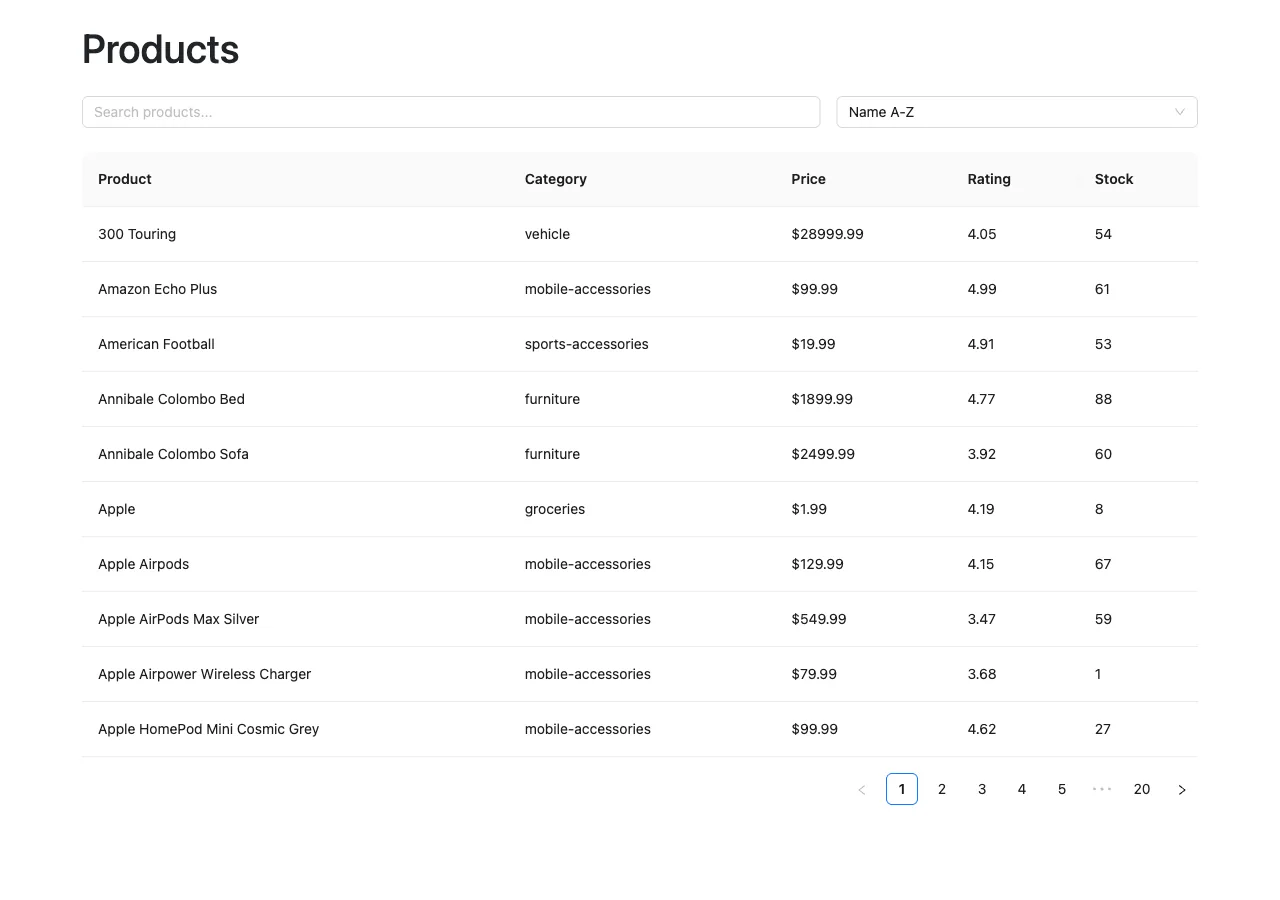
Compare it with the end of Part 1. There's no fetch code, no try/catch, and no loading or error state in sight. What's left in the component is rendering, one piece of local state, and the dispatches. Look closely at the search input's onChange, though — that dispatch(setPage(1)) is a leftover from the bug in the next step.
17. The Bug I Hit: Pagination Jumping Back to Page 1
Once everything was wired, pagination broke in a strange way: click page 2, the table goes to page 2… and then immediately jumps back to page 1. My first guess was that something was resetting page. Only two things do: the setSearch and setSort reducers. So something had to be dispatching one of them after the page changed.
It was the debounce. I'd typed setInterval instead of setTimeout:
useEffect(() => {
  const timeout = setInterval(() => {
    dispatch(setSearch(searchInput));
  }, 300);

  return () => clearTimeout(timeout);
}, [searchInput, dispatch]);
setTimeout runs once. setInterval runs every 300ms, forever, until cleared. The cleanup only runs when searchInput changes — so while you weren't typing, the interval kept firing, re-dispatching setSearch with the same text three times a second. And setSearch resets the page:
click page 2
  → dispatch(setPage(2))
  → page = 2

less than 300ms later
  → the interval fires dispatch(setSearch(searchInput)) again
  → setSearch reducer: page = 1

the table snaps back to page 1
The fix is one word:
useEffect(() => {
  const timeout = setTimeout(() => {
    dispatch(setSearch(searchInput));
  }, 300);

  return () => clearTimeout(timeout);
}, [searchInput, dispatch]);
There was a second, quieter mistake in the same component. Trying to reset the page when typing, I'd written setPage(1) in the input's onChange — without dispatch. That line did nothing at all. setPage(1) is an action creator: it builds { type: 'filters/setPage', payload: 1 } and returns it. Nothing reaches the store until you hand that object to dispatch. Coming from useState, where calling the setter *is* the update, this is an easy one to get wrong.
I fixed it to dispatch(setPage(1)), and that's the line you saw in the final App.jsx. I'm showing the file as it is in the repo rather than tidying it up for the post, so I'll be honest about it: the line is redundant. The debounced setSearch already resets the page 300ms later. Worse, if you're on page 3 when you start typing, it jumps to page 1 of the *old* search right away, which can trigger an extra request (often served from RTK Query's cache). The cleaner onChange is just (e) => setSearchInput(e.target.value).
The real lesson isn't about timers. It's that reducers interact through shared state. setSearch resetting page is the right rule — and it's also exactly why a stray setSearch shows up as a pagination bug. When a value changes unexpectedly, list every reducer that writes it, then find who is dispatching that action. That narrowed this one down in minutes.
Final Project Structure
We didn't start with this structure. Each folder appeared in the step that needed it:
src/
├── app/
│   └── store.js                # Step 11: the store (+ RTK Query in Step 15)
├── features/
│   └── filters/
│       └── filterSlice.js      # Step 10: filter state + reducers
├── services/
│   └── productsApi.js          # Step 14: the API definition
├── App.jsx                     # Step 2 onward
└── main.jsx                    # Step 1, Provider added in Step 12
What Lives Where
The comparison worth remembering:
| Tool | Think of it as |
|---|---|
useState | State that belongs to one component |
| Redux Toolkit | Shared, app-level state that lives outside components |
| RTK Query | API fetching, server state, and caching |
| Ant Design | Ready-made React UI components |
| Bootstrap | Layout and spacing utilities |
And in this app specifically:
useState
└── searchInput               # temporary text being typed

Redux Toolkit
├── search
├── sortBy
├── order
└── page                      # app-level filter state

RTK Query
├── products
├── total
├── loading / fetching
├── error
└── cache                     # server state

Ant Design
├── Input
├── Select
├── Table
└── Alert                     # UI components

Bootstrap
├── container
├── row
├── col-md-*
└── spacing                   # page layout
The Architecture Has a Name
At first the Redux pieces felt like ceremony — slice, store, action, reducer, dispatch, selector. By the end, the same structure read as organized: each piece has one responsibility. The broad name for the pattern is unidirectional data flow — component → dispatch(action) → reducer → store → useSelector → re-render, always in that direction. Redux Toolkit adds slice-based organization on top: state grouped by feature, each slice owning its own rules.
The part that transfers beyond Redux is the order of questions you ask when designing it:
- What state exists?
search,page,products… - Which state belongs together? Group it into a slice.
- How is it allowed to change? Write the reducers.
- Who triggers those changes? They dispatch actions.
- Who reads it? They use selectors.
- Where does it all combine? The store.
Data, then responsibilities, then boundaries, then connections. Redux Toolkit is one well-designed answer to those questions — but the questions are what make the architecture, not the library.
Resources
- Product browser source code on GitHub — the repo this tutorial matches.
- Live product browser demo — the finished app.
- Redux Toolkit: createSlice and configureStore API references.
- RTK Query overview and the createApi reference.
- React Redux hooks: useSelector and useDispatch.
- Redux fundamentals: concepts and data flow — the unidirectional data flow, explained by the Redux docs.
- React reference: useState and useEffect.
- Ant Design Table component.
- DummyJSON products API docs — search, sorting,
limit, andskip. - Vite getting-started guide.
Thanks for reading. If you're hiring for a frontend or full-stack role, I'd be glad to talk it through.