On this page
A practical walkthrough of how I built
liandrejohn.com with Claude Code — not by asking AI
to write more code, but by giving it a smaller system to work
inside. You'll see the context engineering behind it: a scoped
CLAUDE.md for persistent project rules, focused
sessions, task-specific instruction files, and a review step on
every decision before it shipped. It's the same
AI-assisted engineering workflow I use
day to day, and it kept me in control of the output.
1. What I Built
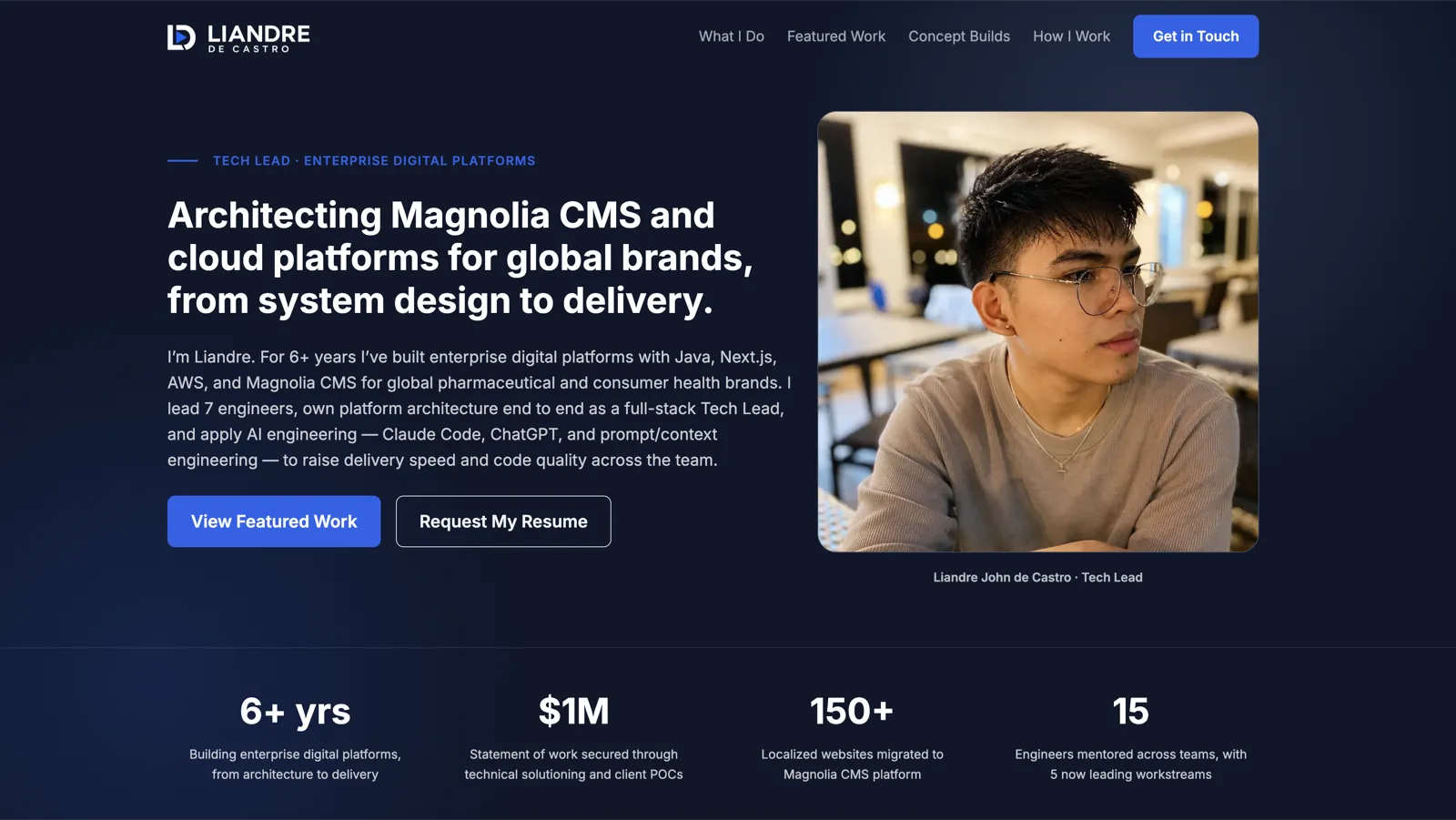
A single-page portfolio for technical recruiters.
Structure
Single Page
One deliberate narrative instead of a maze of pages.
Discoverability
SEO & GEO
Structured data, a clear site map, and explicit crawler guidance.
Delivery
CI/CD
A repeatable path from a merged change to a live site.
Trust
Analytics
Enough signal to learn what works without tracking people around.
2. Tech Stack
A static stack in four layers: frontend, build, hosting, and automation.
Frontend
Bootstrap & Sass
Utilities, components, design tokens, self-hosted Inter, and inline SVG icons.
Build tooling
Vite
Multi-page output, with the homepage and blog as explicit build entries.
Hosting
S3 & CloudFront
A private bucket behind a CDN, with Route 53 and ACM for DNS and TLS — how I deployed it to AWS.
Automation
GitHub Actions
Build, sync, invalidate — authenticated by IAM OIDC, with no static AWS keys.
liandrejohn.com/
├── .github/
│   └── workflows/      # CI/CD automation pipelines
├── CLAUDE.md           # Guidelines for Claude AI
├── dist/               # Build output directory
├── index.html          # Entry HTML template
├── package.json        # Dependencies & run scripts
├── public/             # Raw static assets
│   ├── fonts/          # Web fonts (.woff2, .ttf)
│   └── images/         # Static images & favicons
├── src/                # Source code
│   ├── js/             # Scripts & UI logic
│   └── scss/           # Stylesheets & themes
└── vite.config.mjs # Vite bundler config3. Claude Code
Claude Code works best for me as a collaborator inside a system of constraints — not as an agent I hand a giant prompt and a blank canvas.
Most of my prompts are surprisingly short. What makes them work is context engineering — I put more effort into shaping the context around the prompt than into the prompt itself: persistent instructions, focused sessions, task-specific rules, and review artifacts Claude can work through one step at a time.
3.1 CLAUDE.md: the persistent brain that eliminates prompt bloat
Stop re-explaining your stack in every single prompt. Put the context in the repo once, and keep your prompts short.
My CLAUDE.md structure:
# Portfolio Website
A polished developer portfolio with a clean, modern layout designed
for technical recruiters. Prioritize strong visual hierarchy, generous
spacing, readability, and a professional feel over decorative complexity.

## Main Goal
Make the page easy to scan, visually engaging, and credible within seconds.

## Layout
1. Navbar
2. Hero
3. Credentials
4. What I Do
5. Featured Projects
6. How I Work
7. Contact
8. Footer

## Rules
- Use clear section hierarchy and consistent spacing.
- Keep content widths readable.
- Use strong typography and contrast.
- Avoid clutter and unnecessary decoration.
- Keep layouts responsive across desktop and mobile.
- Reuse the existing color palette and design system.

## Commands
- `npm run dev`     # start local development
- `npm run build`   # create the production build
Because CLAUDE.md loads automatically into the
session, my actual prompts stay razor-sharp:
Build the hero section.3.2 One project, six personalities: context engineering by phase
Don't stuff every rule into a single file. A bloated
CLAUDE.md that covers design, content tone, SEO,
accessibility, and deployment all at once turns into noise.
Instead I keep one specialized instruction file per project
mode and swap the relevant one into
CLAUDE.md when my focus changes.
├── CLAUDE.md             # Default development context
├── CLAUDE-design.md      # UI components, layout tokens, spacing
├── CLAUDE-content.md     # Messaging tone, copy length, value props
├── CLAUDE-seo.md         # Open Graph, metadata, alt-text rules
├── CLAUDE-analytics.md   # GA4 event names and privacy limits
└── CLAUDE-deployment.md # Build checks and S3 + CloudFront deployCLAUDE.md; the rest wait in the repo until that
kind of work comes up.
When I move from building UI components to tuning SEO, I don't
cram new rules into the running conversation. I swap the
relevant file into CLAUDE.md and start a fresh
session.
3.3 The 15% rule: fresh sessions prevent context drift
One focused session per meaningful unit of work. Long conversations breed sloppy code — the context fills up with hallucinated variables, obsolete errors, and stale instruction states. My rule of thumb is to restart the session once context usage hits about 15%, or whenever I finish a distinct task, whichever comes first.
How I iterated on the layout:
-
Session 1 — Hero section
Build the hero section with a headline, bio snippet, and primary CTA.Iterate on feedback until it's done, then exit the session.
-
Session 2 — "What I Do" section
Build the "What I Do" section that lists my core engineering focus areas.A new session, with none of the hero conversation still in context.
3.4 Review artifacts: turn loose audits into executable checklists
Never ask an agent to "review and fix everything" — that leads to sweeping, unexpected changes. Instead I have Claude write an explicit review artifact into the repo first, and change nothing until I've read it.
1. Generate the audit log
Review the homepage for mobile spacing and design inconsistencies.
Flag each issue, suggest a fix, add a Status column, and save the result to local/design-review.md.
Claude writes a structured Markdown file:
# Design Review Audit

| Item | Issue                            | Suggested Fix                                    | Status  |
| :--- | :------------------------------- | :---------------------------------------------- | :------ |
| 1    | Hero padding too large on mobile | Reduce top padding to pt-8 at the sm breakpoint | Pending |
| 2    | Code block overflow              | Add overflow-x-auto to pre tags                 | Pending |
| 3 | CTA button contrast too low | Move text from text-gray-400 to text-gray-100 | Pending |2. Execute granular fixes
I read the list, drop the non-issues, and work through the rest one row at a time:
Fix item 1 in local/design-review.md. Mark it Done when complete.4. Results
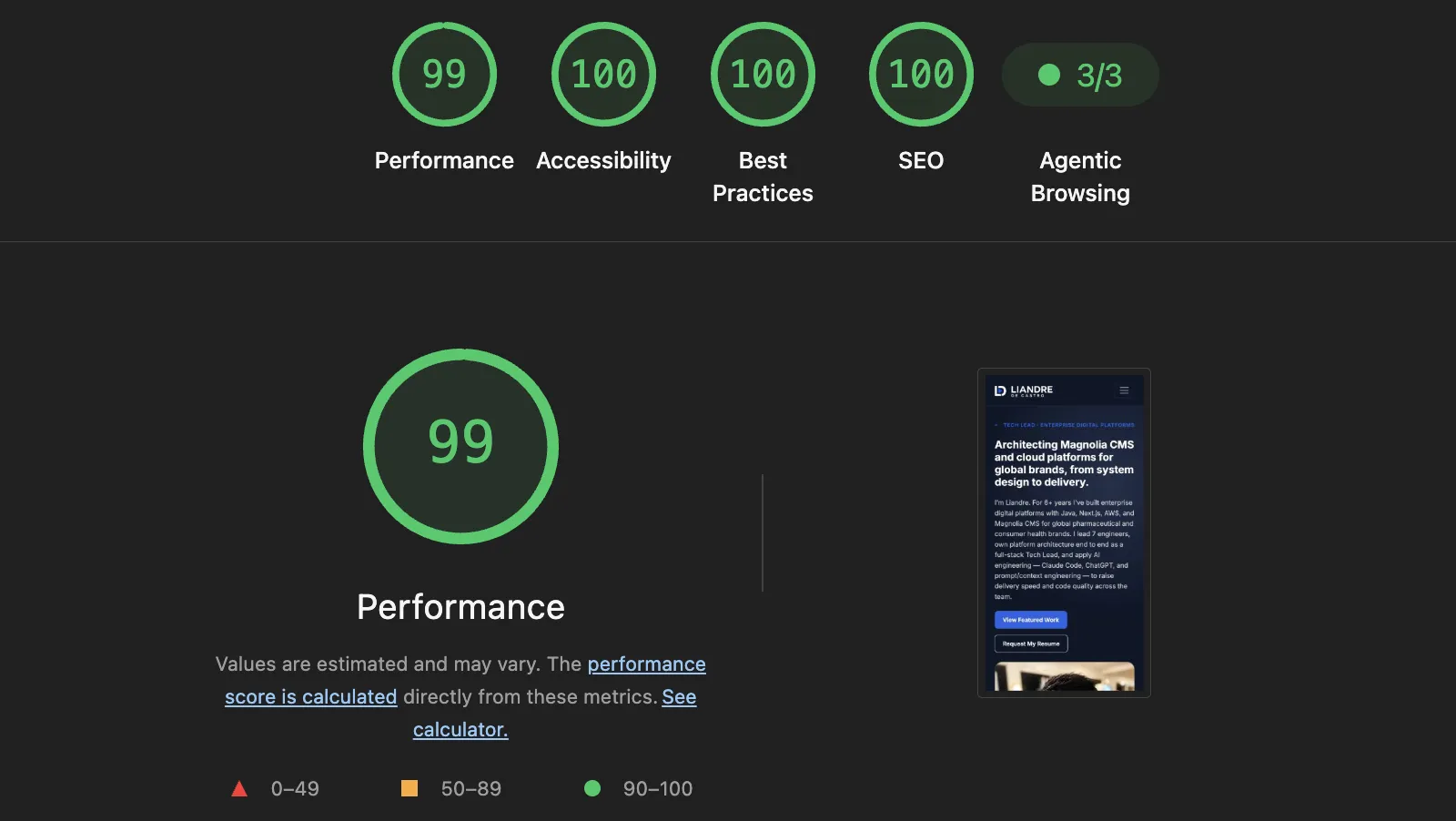
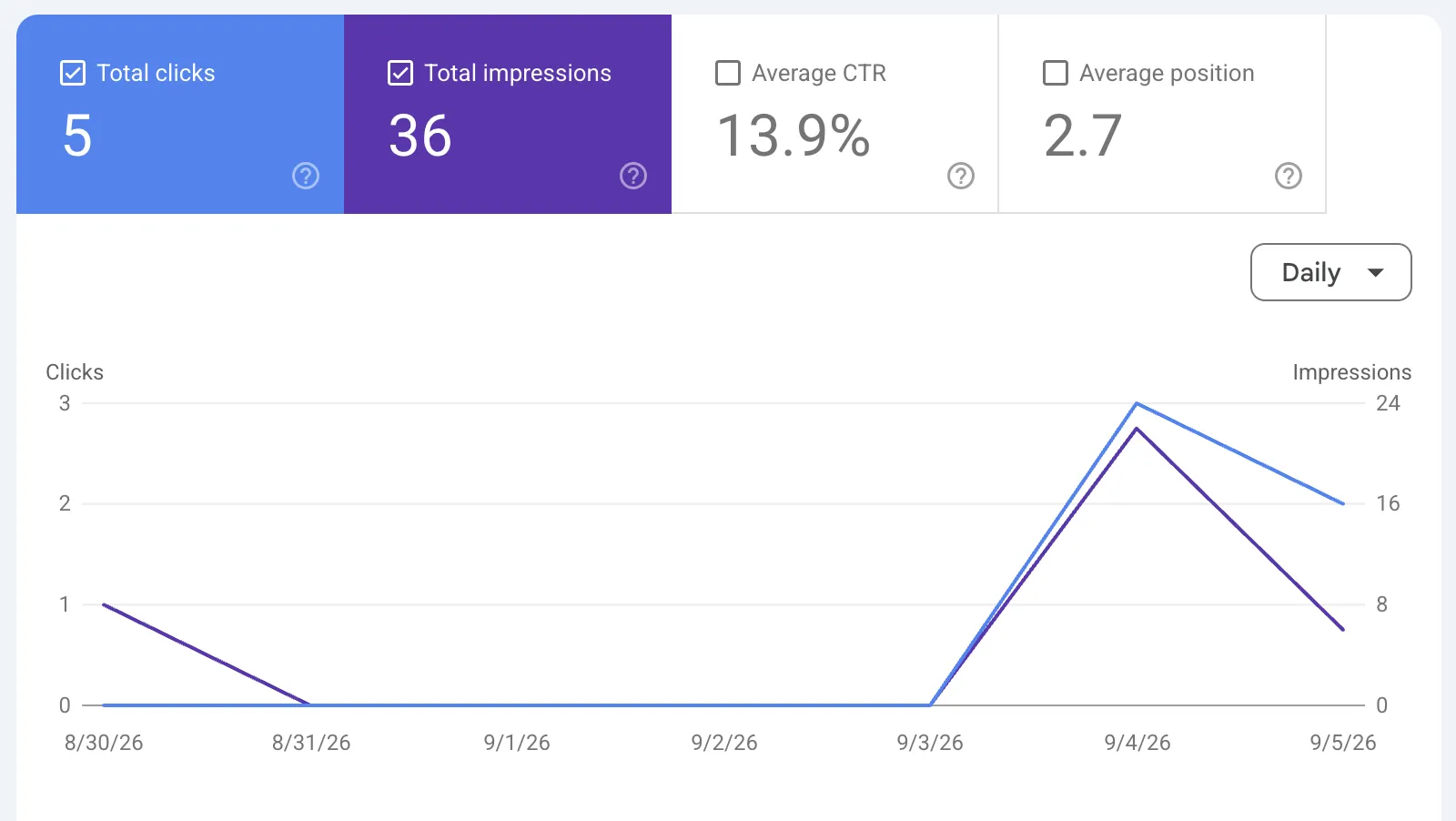
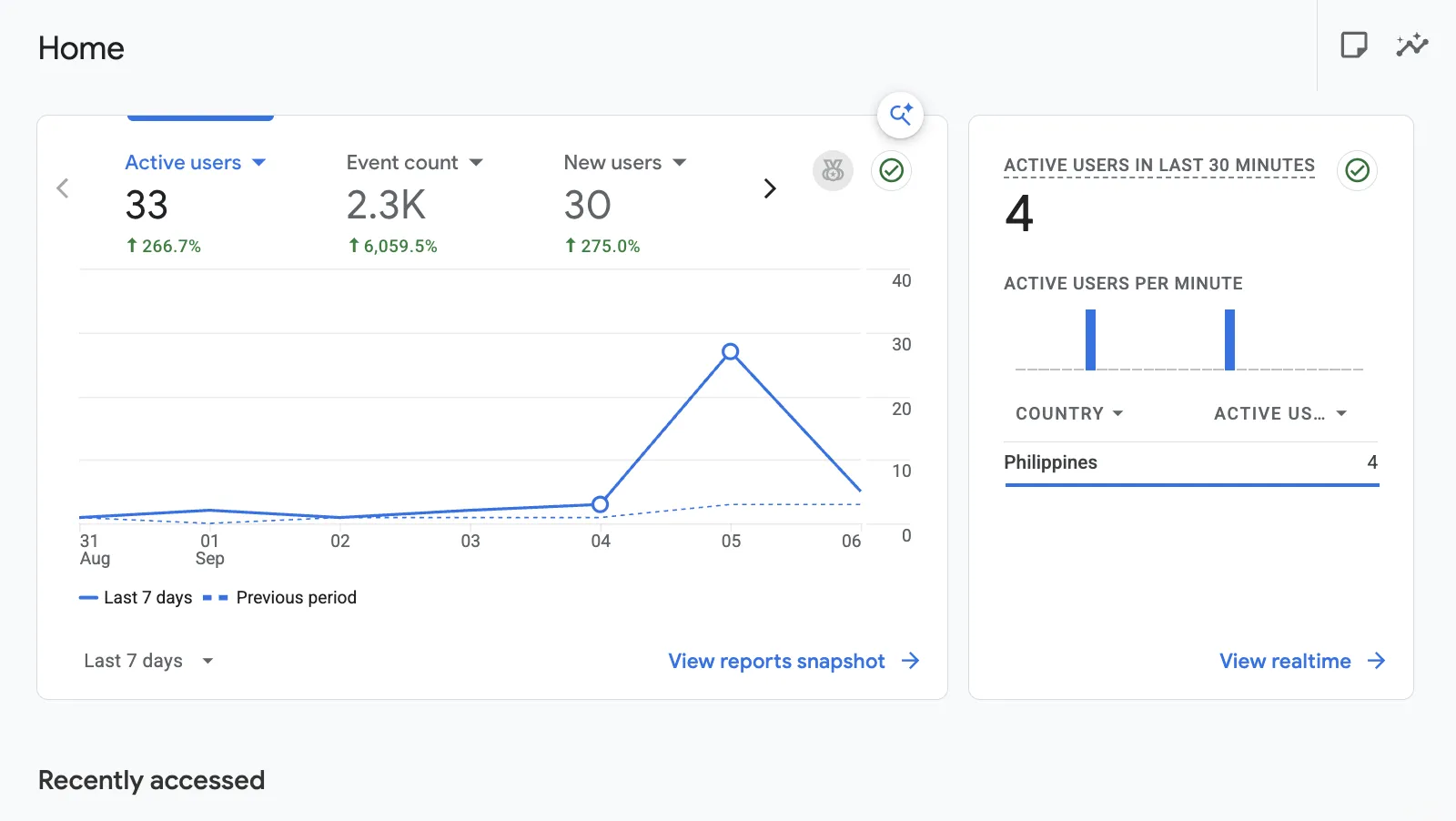
The system shipped a site that is fast, discoverable, and measurable — here is the evidence.
Lighthouse report
Google Search Console
Google Analytics
Live site
5. Conclusion
Building this portfolio proved that exceptional results from Claude Code come down to a disciplined system.
Here is the exact workflow that turned the agent into a high-precision execution tool.
-
Write
CLAUDE.mdonce, save time forever: storing my architecture rules in the repo meant I could issue short, precise build commands. - Change operating lenses as you work: swapping context files for UI, SEO, and CI/CD ensured Claude only cared about the relevant constraints.
- Start fresh before the agent gets confused: wiping context at about 15% usage stopped stale bugs and noise from creeping into clean code.
- Make the agent build its own task list: generating Markdown checklists kept me in complete control before any code actually changed.
Ultimately, Claude Code accelerated my build speed, but the developer system kept me in full control.
AI-assisted engineering isn't about typing fewer lines of code — it's about building the constraints that make execution clean and predictable.
6. Resources
The live site and its complete source.
Thanks for reading. If you're hiring or planning an AI-assisted build, I'd be glad to talk it through.